Introduction to C++ Code
Introduction
In this lesson, we'll cover the basics of programming in C++ and how to control your circuits with code. You'll learn about variables, functions, and how to write simple programs to interact with your circuits.
C++ Basics
C++ is a powerful programming language that is widely used in embedded systems and microcontroller programming. It allows you to write efficient code that can run on small devices with limited resources. Here, you can define variables to store data, call functions to interact with your hardware, and use control structures like loops and conditionals to control the flow of your program.
Variables
Variables are used to store data in your program. You can define a variable by specifying its type and name, and optionally initializing it with a value. For example:
int specialNumber = 4;
This line of code had a few key sections to it. First, we defined the type. In this case, int stands for integer,
which is a whole number. Other types include float for decimal numbers, bool for true/false values, and char for
single characters.
Next, we gave our variable a name, specialNumber, which is how we will refer to it in our
code. Then, we used the assignment operator = to assign it a value of 4. This means that specialNumber now holds the
value 4, and we can use it in our program wherever we need to refer to that value.
We then gave it a value of 4. This means that specialNumber now holds the value 4, and we can use it in our program
wherever we
need to refer to that value. Finally, we ended the line with a semicolon ;, which is used to indicate the end of a
statement in C++.
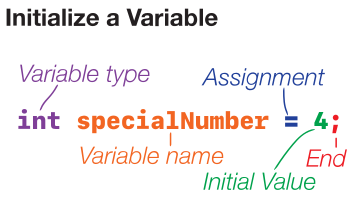
In this example, we define an integer variable called specialNumber and initialize it with the value 4. Later, if we
wanted to change the value of specialNumber, we could simply assign it a new value like this:
specialNumber = 10;
You can use variables to store values that you want to use later in your program, such as sensor readings or the state of a component.
Calling Functions
Functions are blocks of code that perform a specific task. You can call a function by using its name followed by
parentheses (). For example, if you want to set a digital pin to HIGH, you might call a function like this:
digitalWrite(3, HIGH);
In this example, digitalWrite is the name of the function, and we pass it two arguments: the pin number (3) and the
value
(HIGH). This function would set pin 3 to a high voltage level, which could turn on an LED or activate another
component
connected to that pin.
When calling a function, it may also return a value that you can use in your program. For example, if you want to read the value from an analog pin, you might call a function like this:
int sensorValue = analogRead(2);
Here, analogRead is the function that reads the value from pin 2 and returns it as an integer. We store this returned
value
in a variable called sensorValue for later use in our program. We can use this returned result in place of a literal
number.
Functions can take different numbers of arguments and can return values as well. You can use functions to interact with your hardware, perform calculations, or organize your code into reusable blocks.
Here are a few more examples of function calls you might see in your code:
| Function | Description | Example |
|---|---|---|
| digitalWrite | Instructs a pin to output a digital signal until changed. | digitalWrite(1, HIGH); |
| digitalRead | Senses and returns HIGH or LOW from a specified pin. | bool isOn = digitalRead(1); |
| analogWrite | Intstructs a pin to output an analog signal until changed. Accepts from 0-256. | analogWrite(1, 212); |
| analogRead | Senses and returns from 0-1024 the signal strength from a specified pin. | int signal = analogRead(1); |
| pinMode | Sets a pin to either be an ouptut or an input from here on out. | pinMode(1, OUTPUT); |
| delay | Waits without doing anything for a specified length of time, in milliseconds. (1000 milliseconds = 1 second) | delay(1000); |
There are many more functions available for you to use in your code, and we will go over some of these as they become relevant in the upcoming lessons.
Arduino Code Layout
When programming for microcontrollers, we typically have two main functions: setup() and loop(). The setup()
function is called once when the program starts and is used to initialize your hardware and set up any
necessary configurations. The loop() function is called repeatedly in a continuous loop and is where you will write
the
main logic of your program to interact with your circuits.
void setup() {
    // This code runs once when the program starts
}

void loop() {
    // This code runs repeatedly in a loop
}
In the setup() function, you might set pin modes, precalculate some numbers, or perform any setup tasks
required for your project. In the loop() function, you would write the code that controls
your circuits, such as reading sensor values, controlling LEDs, or responding to user input.
Next Steps
In the next lessons, we'll be building projects that use the components in your kit and writing code to control them. You'll learn how to read sensor values, control LEDs, and create interactive projects with your circuits. Remember to experiment with the code and have fun exploring the possibilities of what you can create!
If this is your first time programming, don't worry if it feels a bit overwhelming at first. Programming is a skill that takes time to develop, and the best way to learn is by doing. Start with simple projects and gradually build up your skills as you go. Don't be afraid to make mistakes and learn from them, and remember that there are many resources available online to help you along the way. Happy coding!