Blinky @ Design Expo
Introduction
In this lesson, we'll cover the basics of circuits and electricity, and how to design your very first circuit using the components in your kit. The goal of this project is to create a simple circuit with an LED that blinks on and off at a regular interval.
Wiring the Circuit
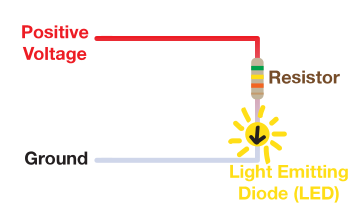
We have included below a circuit diagram that you should mirror in this project. Remember that the LED is directional, meaning it will only light up if you connect it the right way.
You will want to use pin 1 as your source of positive voltage, and connect it in one closed loop through the LED and resistor back to ground (GND). Be careful of the direction of the LED. The arrow on the LED symbol on the components in your kit indicates the direction of current flow.
Writing the Code
Two question marks have been left in the starter code to guide you through writing the code to control your Blinky
circuit. As a reminder, a description of digitalWrite is provided below. Remember that HIGH turns the pin on, and
LOW turns it off.
| Function | Description | Usage |
|---|---|---|
| digitalWrite | Instructs a pin to output a digital signal until changed. | digitalWrite(#, HIGH/LOW); |
Testing Your Circuit
Once you have your circuit wired and your code written, you can test it out by running your program. If everything is set up correctly, you should see your LED blink on and off at a regular interval. If it's not working, double-check your wiring and make sure your code is correct. If you need, you can read through the solution below.